Understand the impact of your interventions
A plan tells you what you're aiming for. Once it's in the room, people start doing things with it, sometimes the things you expected and often something a little different. The Impact Loop is the bit in between, where you notice what they're doing and shape the next session around it.
Three small steps. Repeat them after every Intervention and you'll build a steady stream of insights for your Shift, with the plan adapting to the signals your team is sending.
That rhythm is the difference between a plan that sits in a doc and a Shift that keeps moving. It's also how the platform learns: every loop you run feeds the Shift's memory, so the next Intervention builds on what already happened in the room.
Every loop is about one thing: catching the signals that show whether behavior is moving, and where it's getting stuck. Anything more polished than that gets in the way.
What you'll do
Mark an Intervention as delivered
Tell Shiftic how it went, or let Tilda help you debrief. Upload anything that adds to the picture: transcripts, data, workshop output.
Read the analysis and the signals Shiftic surfaces
Apply the suggested adjustments, or ask Tilda for different ones
Plan on two to five minutes per loop to get an analysis of your intervention.
Step 1. Open the Impact Loop
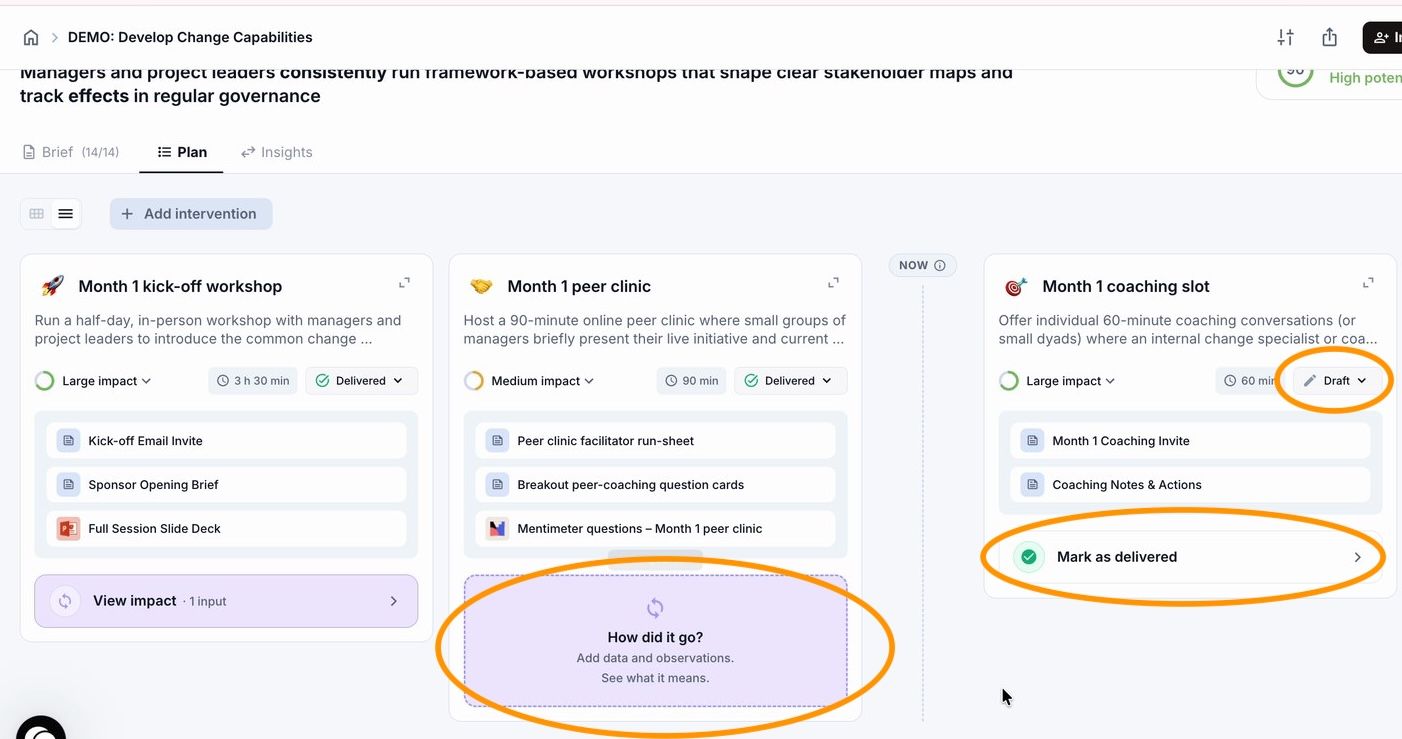
Go to the Plan tab. Find the Intervention that just ran. Once it's marked as delivered, a small card appears underneath it: "How did it go? Add data and observations. See what it means."
Click that card to open the Impact Loop.
Step 2. Tell Shiftic how it went
The first screen of the Impact Loop asks a single question: How did it go? There's a text field, an option to upload data or transcripts, and a button labelled Let Tilda help.
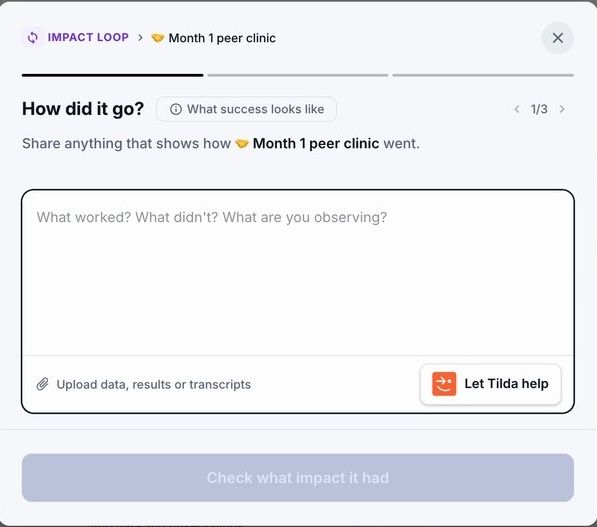
Write what you observed
Type freely. A few sentences are enough. Useful things to include: how the group responded, what got people talking, where energy dropped, what people said they would change, anything that surprised you.
There's no template to fill. The richer the observation, the sharper the signals Shiftic can pull out in Step 3. A line like "good session" gives Tilda very little to work with. A line like "five out of eight participants left with a concrete next step, the other three asked for more practice on stakeholder maps" gives a lot.
Upload data, results, or transcripts
If you collected anything from the session, drop it in. Mentimeter exports, feedback forms, meeting notes, a Word doc of the chat, a transcript. Up to 15 files, 25 MB each. Supported formats: DOCX, PDF, PPTX, XLSX, PNG, JPG, JPEG.
Shiftic reads the files and uses them in Step 3 alongside what you wrote.
What "Let Tilda help" does
If staring at a blank box is the hard part, click Let Tilda help. Tilda becomes your debrief partner: it asks short, specific questions about the session, and turns your answers into the kind of detailed observation that makes Step 3 land.
Useful for the moment right after a session, when you have a sense of how it went but haven't written anything down yet. Tilda pulls the signals out of your head and onto the page, in the same structure Shiftic will reason against later.
Use Let Tilda help when you want to debrief out loud and let the system shape the notes. Use the free-text field when you already know what you want to say.
When you're ready, click Check what impact it had at the bottom of the screen.
Step 3. Read the impact on the Shift
Shiftic reads everything you submitted (your notes, your uploads, Tilda's debrief) and turns it into a interpretation on how the session moved the Shift. You'll see a label like Some impact, High impact, or No impact yet, with a short read on direction.
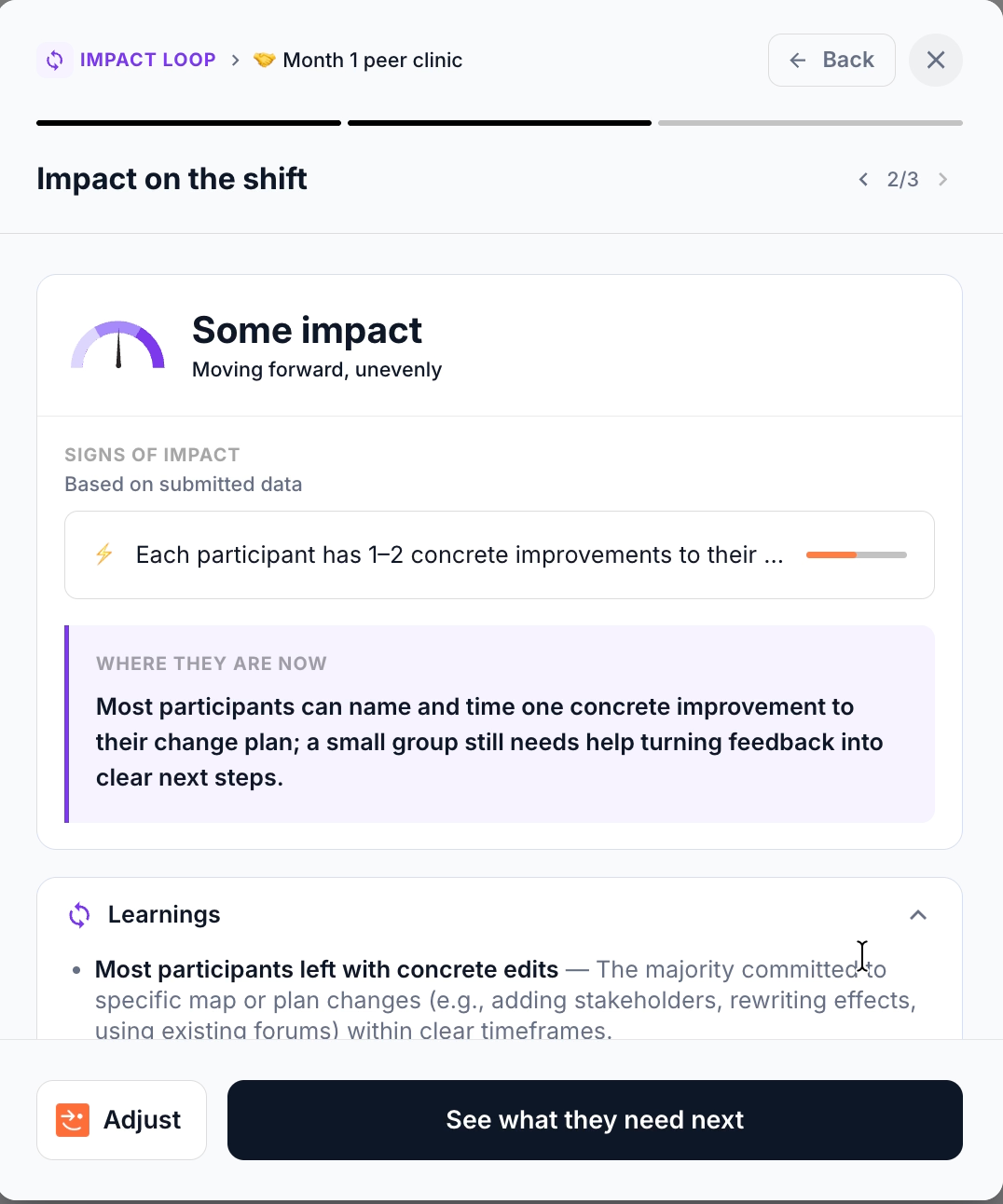
Below the analysis are three sections worth reading carefully:
Signs of impact. The concrete signals Shiftic pulled out of your data. "Each participant has 1-2 concrete improvements to their plan" is a sign of impact. These are the proof points.
Where they are now. Shiftic's read on where your people sit right now. This often surfaces the gap between what the plan assumed and what actually happened.
Learnings. Patterns Shiftic noticed across the data. Things like "a minority stayed stuck on next steps" or "peer structure sharpened thinking." These shape the suggestions in the next step.
Click Learnings to expand it and read the full list of insights.
Step 4. Decide what's next
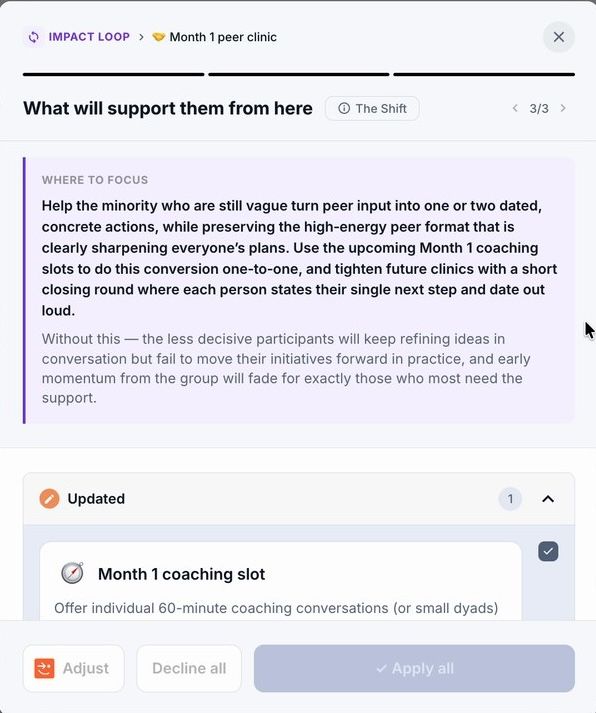
Shiftic translates the learnings into proposed adjustments to your Plan. You'll see a Where to focus block explaining the reasoning, followed by a list of Updated Interventions, each with a checkbox so you can choose what to apply to your plan and upcoming interventions.
Was this helpful?
Still need help? Ask the team